‏إظهار الرسائل ذات التسميات Samsung Galaxy Grand Duos. إظهار كافة الرسائل

السبت، 2 نوفمبر 2013

Unbrick Samsung Galaxy S3 Guide Any Version

Unbrick samsung Galaxy S3 , Unbrick Galaxy S3 , Unbrick Galaxy S3 , Unbrick , Galaxy S3 , S3 , you can now Unbrick Galaxy S3 with our easy way which explain how to Unbrick samsung Galaxy S3 just follow our guide to Unbrick your Galaxy S3 with tested easy way.

Here are the way on How to Unbrick Your Bricked Samsung Galaxy S3
is your device hard bricked samsung Galaxy S3 Unbrick service fast and reliable within 10 minutes or less

Unbrick samsung Galaxy S3 , Unbrick Galaxy S3 , Unbrick Galaxy S3 , Unbrick , Galaxy S3 , S3 , you can now Unbrick Galaxy S3 with our easy way which explain how to Unbrick samsung Galaxy S3

Often times, Android devices get bricked during rooting, installation of custom recoveries or flashing of custom ROMs. Bricking has two types: soft and hard brick. While hard brick cannot be fixed without OEM support, you can unbrick the soft brick easily. If you have US variant Samsung Galaxy S3, here is a fix for you: simply install the stock boot image and you’ll be reverted back to working status.
Note: this fix is just for GSM boot image bricked device, and only for US variant of Samsung Galaxy S3.
Prerequisites: use windows PC and also install USB drivers for your Galaxy S3 on the computer.

How to unbrick Galaxy S3:

Required files: download Odin3 from HERE and stock image according to your carrier. 
Unzip the Odin file and run the .exe file with Admin rights.
In Odin check Auto Reboot and F. Reset Time. Make sure that Re-Partition is unchecked. Do not make any other changes in Odin.
Turn your Samsung Galaxy S3 off and reboot the device into download mode: press and hold Home + Volume down buttons and then press the Power button for some 2 seconds until a warning screen shows up. Now press Volume Up which will take you to downloading mode.
Once you are in download mode, plug the Galaxy S3 to PC using USB cable. If connected successfully, Odin will detect the device, ID:COM will turn yellow and a message saying ADDED!! will appear.
Now click on PDA button in Odin screen and locate the .tar file that you downloaded earlier according to carrier. Click on Start button to initiate installation.
Once the installation is completed successfully, your US Galaxy S3 will reboot itself. You will also see a message saying PASS in Odin.
Now you can disconnect your device from the computer.
That’s it! Hope you got your Samsung Galaxy S3 unbricked following this guide
Do not extract the file though. T-Mobile Samsung Galaxy S3 stock image, AT&T Samsung Galaxy S3 stock image, and Sprint Samsung Galaxy S3 stock image.

Read Also: Download Viber for Android

                 Download Viber For Galaxy S3
                 Download Viber For Galaxy S4
                 Download Viber For Galaxy S2
                 Downgrade Samsung Galaxy S3
                 Downgrade Samsung Galaxy S4
                 Downgrade Samsung Galaxy S2
                 Downgrade Samsung Galaxy S3
                 Downgrade Galaxy S3
                 Downgrade Galaxy S4
                 Downgrade Galaxy S2
                 Download Viber
                 Viber Download
                 Unbrick Galaxy S3

الأربعاء، 30 أكتوبر 2013

Nexus 5 Release Date Approaches: Device Remains Unofficial As Photo Leaks, Pre-Registration Leaks, Spec Leaks, And Inventory Leaks Surface

Nexus 5 Release Date Approaches: Device Remains Unofficial As Photo Leaks, Pre-Registration Leaks, Spec Leaks, And Inventory Leaks Surface


As the Nexus 4 and Android 4.4 KitKat "release-gate" continues and the device and operating system remain unofficial, many tidbits have surfaced in the past day that lead us to believe a launch is still imminent.

Nexus 5 Image Capture Leaks

nexus-5-photo-google-plus-1
Image reportedly taken with a Nexus.  Google +
First, an image, which was reportedly captured with a Nexus 5 handset, was discovered on Google +. The picture of some garden vegetables, probably taken by a Google employee, was quickly taken down; however, EXIF data for the image was collected, and indicates that the image was taken with the Nexus 5. The image is supposedly 3264 by 248 pixels and was captured by an 8-megapixel camera featuring f/2.4 aperture and high-dynamic ranging (HDR). Assuming the image is real, we should be expecting an impressive shooter on the Nexus 5.

 Nexus 5 Release Date Approaches: Device Remains Unofficial As Photo Leaks, Pre-Registration Leaks, Spec Leaks, And Inventory Leaks Surface

Nexus 5 Specs Leaked Through Carrier Pre-Registration Page

wind-nexus5-pre-register-640x533
Wind Mobile pre-registration.  Facebook/Wind mobile
While images taken with the Nexus 5 were being loaded to Google +, a Canadian carrier, Wind Mobile, also loaded its Nexus 5 pre-registration page to their Facebook page. The leak included an extensive list of specs, which we can supposedly expect to see on the Nexus 5.

Nexus 5 Release Date Approaches: Device Remains Unofficial As Photo Leaks, Pre-Registration Leaks, Spec Leaks, And Inventory Leaks Surface


wind-nexus-5-specs
Prospective specs for the Nexus 5.  Facebook/Wind Mobile
According to Wind, the Nexus 5 will feature 4.95-inch 1920×1080 display protected by Corning’s Gorilla Glass 3, a 2.3GHz quad-core Qualcomm Snapdragon 800 processor, 2GB RAM and 16GB or 32GB internal storage options, an 8-megapixel main camera featuring optical image stabilization (OIS), and a 1.3-megapixel front camera, connectivity including Wi-Fi (2.4G/5G) 802.11 a/b/g/n/nc, NFC and Bluetooth 4.0, and the Android 4.4 KitKat operating system.

The Nexus 5 will reportedly be 130 grams in weight and will have dimensions of 69.17 x 137.84 x 8.59 mm. It is expected to include ports and connectors such as microUSB, SlimPort enabled, 3.5mm stereo audio jack, Dual microphones, Ceramic power and volume buttons.

Notably, specs indicate that the Nexus 5 will feature an 8-megapixel camera, as was determined by the EXIF data. Keep in mind that megapixels do not determine photo quality on a device, but rather what a photo will look like printed. The OIS and possibly also HDR would be the technology enabling improved on-screen photo quality.

LG Canada Warehouse Nexus 5 Inventory Leaked

nexus5-465x620
Nexus 5 inventory.  NeoGAF forums
Canada must be extremely anxious to release the Nexus 5 as not only have pre-registration pages for Canadian carriers popped up, but so have images of what may be Nexus 5 inventory at a LG warehouse in Canada. One image notably shows the supposed Nexus 5 box, which was previously leaked.

The images, which were shared on Reddit, where reportedly taken by an LG employee, who says approximately 30,000 Nexus 5 handsets will ship to Canadian carriers and retailers this week. The employee at the “LG western Canadian Distribution Center” details that 26,000 Nexus 5 units will supply Eastern Canada, primarily the carrier Rogers, while 4,000 units will supply Western Canada, mostly going to carriers Bell and Telus. It is safe to say that Toronto-based Wind Mobile is expecting Nexus 5 shipments too. Some suspect that this 30,000-unit inventory does not include supplies, which will be purchased through the Google Play Store.

Other Sightings and Information  

The Nexus 5 has also shown up in another inventory leak recently, at UK retailer Carphone Warehouse, whose system indicates 1,500 white Nexus 5 units in stock. There are reportedly also 1,500 black Nexus 5 units in stock at Carphone Warehouse, bringing its total supply to 3,000. There is no indication as to whether the leak is fake, but inventory listings from Carphone Warehouse are nothing new. The Nexus 4 also appeared in its inventory listings in 2012 just weeks before the device's release. However, that leak did not reveal inventory figures.

Currently, rumors indicate that the Nexus 5 may be announced on Oct. 31 and available at the Google Play Store on Nov. 1. The tip was recently shared by tech informant @evleaks, who has a hit-or-miss track record, but as nearly all of the suggested release dates for the Nexus 5 have passed, fans and pundits are getting extremely anxious for more reliable information.

Google also hosted an event Tuesday, which discussed various updates to Google +. There was no word about the Nexus 5, but as the event commenced, Google uploaded a video teasing Android KitKat onto Youtube. Fans have deciphered from the video that the Android 4.4, and in turn the Nexus 5 may launch in three days, which would place its release date for Nov. 1.


Samsung GALAXY Round vs. LG G Flex


Samsung GALAXY Round vs. LG G Flex

Nun sind sie also endlich beide offiziell. Während Samsung sein GALAXY Round bereits vor ein paar Tagen offiziell vorstellte, sind gestern die Südkoreaner von LG nachgezogen und haben ihrerseits ihr LG G Flex offiziell vorgestellt. Bei beiden Modellen handelt es sich um die ersten Smartphones mit einem gebogenen Display. Doch Samsung und LG gehen die Sache unterschiedlich an und biegen ihr Display anders.

Das Samsung GALAXY Round war das erste Smartphone mit einem gebogenen Display. Das Modell ist im wesentlichen ein leicht modifiziertes Samsung GALAXY Note 3, bei dem der Akku bauartbedingt etwas kleiner ausfällt und der S-Pen weggelassen wurde. Ansonsten entsprechenden die technischen Daten des Samsung GALAXY Round dem des auf der IFA 2013 vorgestellten Note 3. Und auch das LG G Flex hat einen berühmten Vorfahren, dass LG G2. Auch hier ist die Ähnlichkeit sehr auffallend.
Doch kommen wir nun zum Vergleich des Samsung GALAXY Round mit dem LG G Flex. Während das Samsung ein horizontal konkav gebogenes 5,7'' FullHD-Display besitzt, muss sich das LG G Flex mit einem vertikal gebogenen 6'' HD-Display zufrieden geben. Hier scheint Samsung bei der Entwicklung schon ein wenig weiter zu sein. Im inneren beider Smartphones schlägt der Qualcomm Snapdragon 800, beim Samsung GALAXY Round von 3GB unterstützt, beim LG G Flex sind es "nur" 2GB.


Dafür punktet das LG G Flex mit einem wahrscheinlich ebenfalls leicht gebogenem 3.500mAh Akku., hier muss sich das Samsung GALAXY Round mit einem 2.800mAh Akku zufrieden geben. Beim Samsung GALAXY Round kommt Android 4.3 zum Einsatz, beim LG G Flex vermutlich noch Android 4.2.2. Das Samsung Smartphone wird als Prototyp in geringer Stückzahl nur in Südkorea erhältlich sein, beim LG G Flex nimmt man an, dass es einen weltweiten Marktstart geben könnte.

الخميس، 11 يوليو 2013

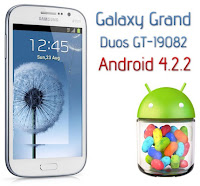
Install Android 4.2.2 Jelly Bean Leaked Firmware on Galaxy Grand Duos GT-I9082

Install Android 4.2.2 Jelly Bean Leaked Firmware on Samsung Galaxy Grand Duos GT-I9082, Update Samsung Galaxy Grand DUOS GT-I9082 to Android 4.1.2 Jelly Bean, Android 4.2.2 Jelly Bean official test firmware, version XXUBMF2, has been leaked for Samsung Galaxy Grand DUOS GT-I9082, which is currently running on Android 4.1.2. Galaxy Grand Duos I9082 users can now Install Android 4.2.2 XXUBMF2 Jelly Bean Firmware on Galaxy Grand Duos I9082 just follow our guide below.
Install Download Android 4.2.2 Jelly Bean Galaxy Grand Duos Android 4.2.2 Update GT-I9082 Download Android 4.2.2 on Galaxy Grand Duos GT-I9082 Leaked Firmwares ROMs Samsung Galaxy Grand Samsung Galaxy Grand Duos Samsung Galaxy Grand DUOS GT-I9082 Install Android 4.2.2 on Galaxy Grand Duos GT-I9082
Install Android 4.2.2 Jelly Bean Leaked Firmware on Galaxy Grand Duos GT-I9082
Android 4.2.2 Jelly Bean official test firmware, with build version XXUBMF2, has leaked for Samsung Galaxy Grand DUOS bearing model number GT-I9082, which is currently running on Android 4.1.2.

Install Android 4.2.2 Firmware on Galaxy Grand Duos GT-I9082

Install Download Android 4.2.2 Jelly Bean Galaxy Grand Duos Android 4.2.2 Update GT-I9082 Download Android 4.2.2 on Galaxy Grand Duos GT-I9082 Leaked Firmwares ROMs Samsung Galaxy Grand Samsung Galaxy Grand Duos Samsung Galaxy Grand DUOS GT-I9082 Install Android 4.2.2 on Galaxy Grand Duos GT-I9082

Galaxy Grand Duos GT-I9082 have another new leaked Jelly Bean Android 4.2.2 firmware for Galaxy Grand Duos GT-I9082. The firmware is now available for download and can be installed via Odin.

Samsung Galaxy Grand Duos GT-I9082 Android 4.2.2 ROM has been leaked, it brings quite a few improvements and enhancements.

Android 4.2.2 forGalaxy Grand Duos GT-I9082


Android 4.2.2 on Samsung Galaxy Grand Duos GT-I9082 Features compared to the previous Android 4.1.2
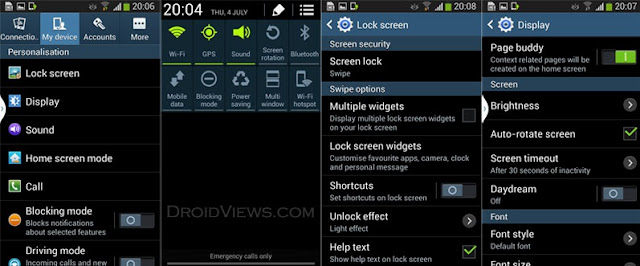
The leaked Android 4.2.2 for Samsung Galaxy Grand Duos GT-I9082 update bring many new features such as:

  • New Android 4.2 lockscreen with multi-page and widgets support.
  • New tabbed UI in Settings like Galaxy S4
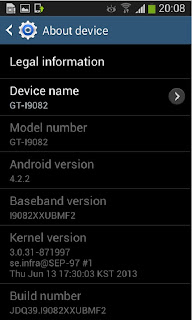
  • Now you can change device name from Settings> More> About and then by tapping on Device Name
  • Ripple and light effects on the lockscreen from Galaxy S4.
  • Transparent notification bar
  • Smart Stay
  • Light effect by unlocking
  • Page Buddy and Daydream
  • Notes Sammobile
  • With the new update, the device has become faster
  • The update brings improvement to battery life
  • No new feature has been added to the camera app.
Android 4.2.2 on Samsung Galaxy Grand Duos GT-I9082

Install Android 4.2.2 Jelly Bean Leaked Firmware on Galaxy Grand Duos GT-I9082

Read these Pre-Requisites first before Update Galaxy S4 GT-I9505 to Android 4.3 J B
  • The device will no longer belong to a rooted version with the installation of official firmware.
  • The phone will lose custom ROM with the installation of official firmware. Additionally, it will lose custom recovery such as ClockworkMod/TWRP which will be replaced by stock recovery.
  • instructions in this guide are applicable to only Galaxy Grand Duos GT-I9082 model . It will not work on any other device. by navigating to Settings > AboutPhone you will be able know what is your device model 
  • Back up important data and settings on the device to avoid data loss you never know when anything might go wrong:
  1. Backup your Apps.
  2. Backup your SMS messages.
  3. Backup Contacts, Gmail and Google Data.
  4. Backup Call History.
  5. Backup WhatsApp Messages.
  6. Backup APN Settings: GPRS, 3G, MMS Settings. How? Note down everything from: Settings > Wireless & Networks (More…) > Mobile networks > Access Point Names.
  • Make sure that your Galaxy Grand Duos GT-I9082 phone is factory unlocked.
  • Make sure to install the correct USB drivers Download Galaxy Grand Duos GT-I9082 USB drivers from Here or Here on computer or you can Download Latest Samsung Kies i prefer to perform the task with Galaxy Grand Duos GT-I9082 USB drivers not samsung kies.
  • This is very important to Enable USB Debugging mode on the Galaxy Grand Duos GT-I9082, 2) Enable USB Debugging Mode on the phone to connect it to the computer and use Android SDK with it. [Press Menu>> Settings>> Applications. From there navigate and click on Development option and check the USB Debugging Mode.]  
  • During firmware installation your Galaxy Grand Duos GT-I9082may shutdown if it is not charged well so make sure that the phone has at least 85% battery charge.
  • ODIN is designed to work in Windows OS only. Linux and Mac OS X users should use CrossOver Utility to run ODIN on their computer.

Install Android 4.2.2 Jelly Bean Leaked Firmware on Galaxy Grand Duos GT-I9082

Please note that this firmware is a test version and has a wipe attribute. It means that it will reset your phone when installed. To avoid any data loss, backup your apps and files stored on internal SD card. as we explain above.
  • Download Android 4.2.2 on Galaxy Grand Duos GT-I9082
The first step will be to Download Android 4.2.2 for Galaxy Grand Duos GT-I9082 and make sure to follow these steps one by one carefully to be able to Download Android 4.2.2 on Galaxy Grand Duos GT-I9082 succusfully and Update Galaxy Grand Duos GT-I9082 to Android 4.2.2

Warning: this guide is only to Install Android 4.2.2 Jelly Bean Leaked Firmware on Galaxy Grand Duos GT-I9082 and it is only for Samsung Galaxy Grand Duos GT-I9082. by navigating to Settings > AboutPhone you will be able know what is your device model.
Android 4.2.2 Galaxy Grand Duos GT-I9082

Step by step to: Install Android 4.2.2 Jelly Bean Leaked Firmware on Galaxy Grand Duos GT-I9082

Step-1: Download on your computer Android 4.2.2 firmware for Galaxy Grand Duos note that I9082XXUBMF2_I9082OXABMF2_OXA.rar is rar file.

Step-2: Extract the downloaded firmware to get a .tar.md5 file with other files 

Step-3: Download Odin v3.07 which will help to install the Android 4.2.2 firmware. Extract the Odin zip to get Odin3 v3.07.exe and some other files  

Step-4: Switch off the Galaxy Grand and wait for five to six seconds for the vibration to confirm complete power off

Step-5: Boot the device into Download Mode by pressing and holding Home, Power and Volume Down buttons together   

Step-6: Launch Odin3 v3.07.exe as an Administrator     

Step-7: Connect the Galaxy Grand to the computer using USB cable while it is in Download mode. Wait for 6 seconds until Odin detects the device. When the phone is connected successfully, the ID: COM box in Odin will turn yellow with the COM port number. This step may take long time so be patient.

Note: If the Added message does not appear, then try the USB port located at the back of the computer. If Odin still fails to detect the device, then re-install USB driver.   

Step-8: Select these files extracted from I9082XXUBMF2 folder to install on the phone

a) Hit the PDA button and select the tar file tar.md5 file

b) Now go and click Phone button and select file with MODEM in its name

c) Hit CSC button and select file with CSC, Click on CSC button and select CSC_OXA_I9082OXABMF2_871997_REV05_user_mid_noship.tar.md5 
d) Click the PIT button and select the .pit file

Note: Ignore the last three steps (step-b, c and d) if such files do not exist.

 Step-9: Configure the Odin settings. Check the Auto Reboot and F.Reset Time checkboxes are selected in Odin window. But uncheck the Re-Partition option; select it only when a .pit file is being used

Step-10: Click the Start button in Odin. The installation process should begin now and would take about few minutes to complete

Step-11: When the installation process is completed, the phone will restart automatically. Also, the successful installation will be indicated by a PASS message with green background in the extreme left box at the very top of Odin. Now, safely unplug the USB cable from the phone to disconnect it from the computer

Samsung Galaxy Grand Duos should now be updated with Android 4.2.2 XXUBMF2 Jelly Bean official test firmware. Navigate to Settings>> About phone to verify the new software version running on the device. 
Read also: