Got Root? Here are Some of the Best Apps for Rooted Android Devices!
Best-Apps-for-Rooted-Android
Download Apps for Rooted Android Devices
I have been using mobile phone’s since the days when it used be bulky like a walkie and had an antenna on the top. Just go back a few years ago and compare the phones of the day to the smartphones that we own today, and you’ll realize that their evolution has been fantastic. I have also been lucky enough to experience all major platforms, from java-based devices down to Symbian, Windows 6, WebOS, Android, iOS and the newer Windows Phone too. I first, first came to know about Android during the days when the smartphone world was ruled by Nokia-made Symbian devices. For many, Android was just a thing of curiosity then.
Having got bored of Symbian, it was much later that I decided to switch to Android and bought my first device the Galaxy S. the new OS was attractive but after a few months, I was still unable to figure out why it was so popular. The difference between my old and new OS’s seemed marginal. Having spent about 4 months with my first Android phone in its virgin state, I came to know about a new thing called “rooting” that sounded to me synonymous to “bricking” my phone.
Download Apps for Rooted Android Devices
Anyway, I finally took that bold step with bouncing heart and only after after that adventure, I was able to get a deeper peep into Android. I believe that anyone reading these lines would not deny that it is impossible to enjoy Android to its full without rooting it. Voiding one’s phone’s warranty might sound a good idea to all, but rooting pays for it pretty well. If you wish to enrich your experience with your phone or tablet, rooting is the only way to achieve the ultimate performance and customization whether it be getting speedy response, better battery, enhanced features, tweak system or make visual changes.
Today, we’ll see some really good, and also popular, apps that can help you get most out of your Android device. As the very title of the present article makes it evident, all these apps require root access to function. And therefore, you must have a rooted device before you can use them. If you have not yet rooted your Android and are still looking for a safer way to do it, please browse our rooting tutorial section.
So, here begins our list of some of the best apps, in no particular order, for rooted Android phones and tablet devices.
JuiceDefender Ultimate
The bigger the screen, the better the fun, isn’t it? We all like a smartphone or tablet with a big screen that show everything with minutest detail and vivid colors. In most cases, OEM’s use battery according to the screen size of a device. Then why it is that the bigger the screen, the least the battery runs? You’ll hardly find a guy who is happy with the battery performance. In a situation where we cannot extend the capacity of the battery of our device, it’s wise to manage the battery power to get better performance out of it. Battery drain is the biggest concern of any smartphone user but if you have root, you can enjoy better performance using a 3rd-party power-save app.
JuiceDefender
While you can find hundreds of battery-saver apps at the Play Store, there are just a few that really possess the magic wand. And among such apps, JuiceDefender Ultimate is probably the king of all. It is a mighty power manager app packed with advanced functions that controls, checks and manages all features and resources that devour the battery juice of your device. The app employs a bunch of effective measures to give you the best possible battery backup, and it does so by intelligently managing the channels that suck the battery most. It features highly customizable options to curb battery drain and get it up to your expectations.
Xposed Framework
Root access on an Android device gives you the license to do almost anything and when it comes to personalization of your device, modifying the available features and adding new things to it, Xposed Framework is an ultimate tool. It is a custom framework that replaces the default framework of your devices and adds the ability to be modified via compatible modules.
The presence on Xposed framework and its modules ensure that you get the power to control the visual elements on your device in your hands. You can customize things like the statusbar items, notification panels, extend reboot menu options, enable call recording, manage connectivity features, install third-party icon packs on stock launcher and thousands of such tasks very easily without having the knowledge of editing system apps and XML codes. To read more about Xposed Framework and its modules, please head over to our detailed article.
Download Latest Xposed Framework Installer
Tasker
Extending our list of best apps for rooted devices, I’m now going to talk about an app that hardly requires any introduction if you not a novice with Android. Tasker for Android is a must have app if you are an advanced or power user, but it offers much even if you are new to it. It is a kind of personal genie that is capable of granting your daily mobile wishes.
Tasker is a task control and automation tool that, if used wisely, can multiply your mobile experience many times. The app has lots of advanced features that let you program your devices by adding tasks to make your device do things according to the rules defined by you. It lets you determine the behavior of apps and features as you might wish them to behave, whether it be to assign a task based on sensors, schedule app automation, control data and network connectivity and so on. It can do almost anything you can imagine. If you are a hardcore Android user, Tasker might prove a dream app for you.
ROM ToolBox Pro is a perfect example that shows the immense possibilities offered by root access on Android. As its very name proclaims, it is not just a tool for rooted Android devices, but a collection of various advanced useful tools with plethora of options for customizing the performance and user interface of your phone or tablet.
Here is a list of the major tools that Root ToolBox Pro combines:
App manager
ROM management
DNS changer
Terminal Emulator
Task manager
Scripter
Root file browser
SD Booster
build.prop editor
CPU control
Kernel tweaks
Font installer
Theme manager
Theme chooser
Boot animation changer
Icon changer
Reboot manager
On expanding each of the listed tools, you’ll get more options related to specific tools. Any app that has so much to give you at the price of one is definitely a good
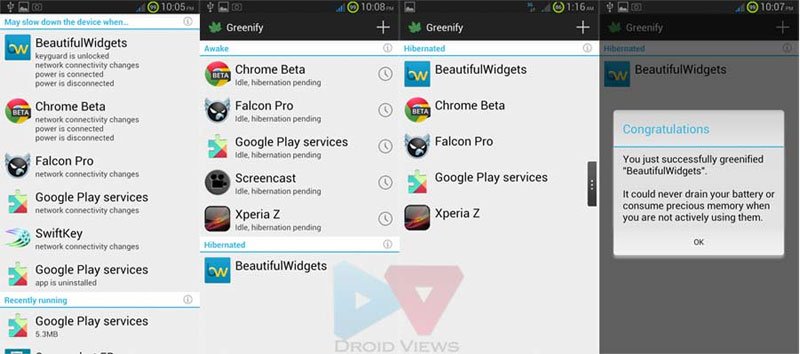
While apps like JuiceDefender Ultimate and ROM ToolBox Pro aim at giving you better battery life and enhanced performance on your Android device respectively, Greenify targets both ends at the same time. Greenify lets you select apps that remain active and run as background processes even when they are not actively running. Now, such apps not only eat your phone’s ROM, making it slow and laggy, but also keep draining the precious battery juice continuously.
If you are one who is fond of installing a lot of apps, Greenify can save you from being worried about performance and battery life. It lets you identify rogue apps and allows you put them in hibernation mode so that they do not keep eating CPU and RAM resources and leeching battery power. The app is pretty easy to use. Simply add the applications you want to hibernate when they move to the background, and let Greenify do its spell.
Titanium Backup
Good battery life, awesome performance and cool customization— we have seen one or more apps for these things. Now let’s see another must have and one of the most rated apps for rooted Android devices. If you got root privileges on your device, Titanium Backup is a highly recommended app for you. You might find a number of backup apps at the Google Play Store, but none of them does the job so perfectly and nicely. The only negative thing about the app is it user interface that feels outdated, but when it comes to functionality, Titanium Backup surpasses them all.
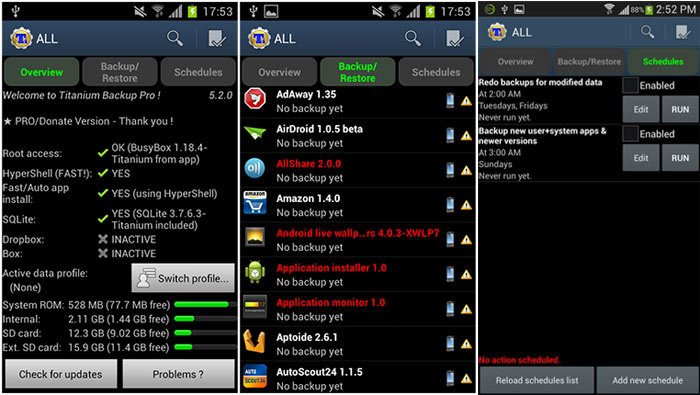
This best in class app can backup all apps (including system apps) and games on your apps with all app settings and data. You can backup apps individually, in groups or all at once. Also, before backing up or restoring the apps, you can choose whether to do the operation just with the apps, settings and data or a combination of all three. Besides, it also lets you schedule your backups. If you purchase the Pro key, you will also be able to use some premium features like—
- Data migration (important for those who are fond of switching ROMs)
- Dropbox sync and restore
- Multiple backups per app support
- Zero-tap batch restore
- App freezer for keeping an app unchanged
- Backup apps without closing any app
- And more.
GooManager
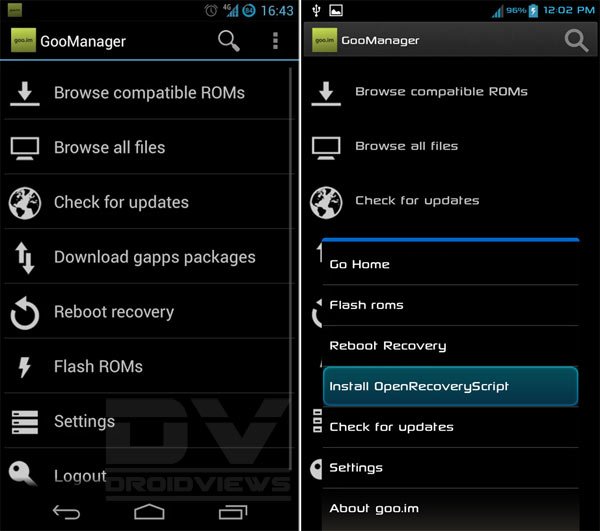
If you are not new to Android, you must be familiar with the goo.im website that is one of the most popular hubs of Android custom ROMs, Google apps packages and popular custom recovery like TWRP. The GooManager app is a front-end app for users of rooted Android devices that can perform various tasks very easily. If you have root, you can install and update TWRP Recovery (if available) through this app. Since most custom ROMs for Android are hosted or mirrored at the goo.im site, the app is also capable of installing and updating ROMs on your device.
You can browse compatible ROMs and Gapps and download all available files directly on your phone or tablet. The app also works like a reboot manager that lets you get your device into recovery mode without using the hard-keys combination.
Some More Apps
The list of best apps for root users is not yet complete. I have more apps in mind which I wish to include. Just exhausted by the length of the post, so here are some more apps without details to save time and space:
Trickster Mod Kernel
Root Browser
Full!screen
Settings Extended
GMD GestureControl
Root App Delete
App Quarantine Pro