‏إظهار الرسائل ذات التسميات Android Ice Cream Sandwich. إظهار كافة الرسائل

الخميس، 7 نوفمبر 2013

Android-Ice Cream-Sandwich Wochenrückblick KW 39

Auch in der vergangenen 39. Kalenderwoche gab es wieder einige aufregende Meldungen zu berichten. Hauptthema war wohl zum Ende der Woche, dass Samsung einen regionalen SIM-Lock bei den neuen Geräten des Samsung GALAXY Note 3, GALAXY Note 2, Samsung GALAXY S4, GALAXY S4 Mini und GALAXY S3 einführt. Zum Anfang gab es eine schlechte Kommunikation der Südkoreaner so dass die User dachten, dass sie ihr Modell nicht im Ausland nutzen konnten. Doch Samsung stellte dies zum Glück richtig.

Es ist also alles doch nicht so schlimm, trotz des regionalen Samsung SIM-Lock kann man die Smartphones von Samsung auch weiterhin ganz normal benutzen, man muss die Erstaktivierung lediglich im Land des Kaufes mit einer regionalen SIM-Karte machen. HTC kommt nun so langsam mit dem HTC One Android 4.3 Update voran, in Taiwan und einigen anderen Ländern ist es bereits gestartet. Bei uns könnte es aber noch bis November dauern laut einer inoffiziellen Meldung.


Auch Samsung hat seinen Android 4.3 Fahrplan bekanntgegeben, bis Ende des Jahres sollen alle wichtigen Modelle mit dem Update versorgt sein. Und Samsung plant weiter für die Zukunft, im nächsten Jahr ist die Vorstellung einer neuen Samsung GALAXY F Reihe geplant, diese soll noch über der GALAXY S Reihe angesiedelt sein und mit neuem Design und hochwertigen Materialien überraschen. Und hier nun die 10 am meisten gelesenen Artikel auf Android-Ice Cream-Sandwich in der vergangenen Woche:

Highlights der 39. KW

Android, Android 4.0, Android 4.0 Ice Cream Sandwich, Android Ice Cream Sandwich

السبت، 2 نوفمبر 2013

Android 4.4 Teaser online [Video]

Android 4.4 Teaser online [Video]

Android 4.4 Teaser online [Video]

Vor ein paar Minuten wurde der erste Android 4.4 Teaser online gestellt. Nein, in dem Video gibt es leider auch keine neuen Bilder der kommenden Android Version zu sehen. Vielmehr handelt es sich bei diesem Teaser wohl eher um einen Appetizer, der uns die Wartezeit ein wenig versüßen soll. Fakt ist jedoch, dass es bis zu Android 4.4 Release nicht mehr lange dauert, spätestens Donnerstag dürfte die neue Version offiziell vorgestellt werden.

Android 4.4 Teaser online [Video]
Über Android 4.4 weiß man bisher, im Gegensatz zum Nexus 5, kaum etwas. Es gab zwar schon ein paar Leaks und auch bewegte Bilder, doch handelte es sich dabei meistens um frühe Entwicklungsversionen von Android 4.4. Daher dürfte es bei dem Release doch zu der einen oder anderen Überraschung kommen. Es gibt zwar ein paar Hinweise, was es Neues gibt, aber handfeste Fakten über neue Android 4.4 Features gibt es bisher nicht.

Es wird vermutet, dass Android 4.4 einen neuen Launcher bekommen wird und das es ein paar kleine optische Veränderungen, eine feste Integration von Druck- und Bezahlfunktionen sowie diverse Performance-Verbesserungen geben könnte. Wie gesagt, bisher alles aber reine Spekulation. Daher rechnen auch viele mit einigen Überraschungen während des Android 4.4 Release Events. Wenn es denn eines geben wird.

Heute um. doch dort wird es mit 99%iger Wahrscheinlichkeit nicht zum Android 4.4 Release kommen. Google wird sicherlich für einen so wichtigen Anlass ein eigenes Event ansetzen. Doch lange warten müssen wir nicht mehr, der Oktober ist fast vorbei.

Samsung Android 4.3 Update für GALAXY Note 2, GALAXY S3, GALAXY S4 Mini und GALAXY Mega offiziell angekündigt


Samsung Android 4.3 Update für GALAXY Note 2, GALAXY S3, GALAXY S4 Mini und GALAXY Mega offiziell angekündigt

Samsung hat nun das Ausrollen neuer Funktionen für seine Smartphone-Modelle und eine breitere Unterstützung für seiner erste eigene Smartwatch Samsung GALAXY Gear angekündigt. Ferner wurde auch für die Modelle Samsung GALAXY Note 2, Samsung GALAXY S3, Samsung GALAXY S4 Mini und Samsung GALAXY Mega das Android 4.3 Update offiziell angekündigt. Damit werden dann auch diese Modelle mit der Samsung GALAXY Gear kompatibel sein.

Samsung Android 4.3 Update für GALAXY Note 2, GALAXY S3, GALAXY S4 Mini und GALAXY Mega offiziell angekündigt

Samsung hat nun das Android 4.3 Update für die Modelle GALAXY Note 2, GALAXY S3, GALAXY S4 Mini und GALAXY Mega offiziell angekündigt. Während für die beiden erstgenannten Smartphone das update noch im November bzw. Dezember erfolgen soll, müssen sich die User letztgenannter beider Modelle noch ein paar Monate gedulden. Hier haben die Südkoreaner noch keinen genauen Termin für das Android 4.3 Update bekannt gegeben.

Samsung Android 4.3 Update für GALAXY Note 2, GALAXY S3, GALAXY S4 Mini und GALAXY Mega offiziell angekündigt

Ferner kündigte Samsung auch an, dass das Samsung GALAXY Note 2 und das Samsung GALAXY S3 auch Teile der hauseigenen Premium Suite erhalten werden, wahrscheinlich geschieht dies im Zuge des jeweiligen Android 4.3 Updates. Dieses beinhaltet den Easy Mode, Multi Window und erweiterte Kamera-Optionen. Außerdem kommen damit die Sicherheits-Tools SAFE (Samsung for Enterprise) und Samsung KNOX auf die Smartphones.

Samsung Android 4.3 Update für GALAXY Note 2, GALAXY S3, GALAXY S4 Mini und GALAXY Mega offiziell angekündigt

Leider hat es Samsung bisher verpasst, genau Termine für die jeweiligen Android 4.3 Updates zu nennen. Jedoch sollten das Samsung GALAXY Note 2 und das Samsung GALAXY S3 noch in diesem Jahr mit dem Android 4.3 Update versorgt werden, hier standen ja immer der November und Dezember zur Debatte. Mal sehen, ob es was wird.

الجمعة، 1 نوفمبر 2013

Set Wallpaper on Android Devices without Cropping

How to Set Wallpaper on Android Devices without Cropping

How to Set Wallpaper on Android Devices without Cropping

crop-wallpapers-android

Android is an awesome platform for smartphones and tablet devices. It offers more features, apps an choice of devices to users. Most of the world’s greatest OEMs manufacture Android devices and, as a result, we have hundreds of device models to choose from. Being of different screen sizes, Android does not have a universal resolution for wallpapers. Thus, if you have a low or mid-end smartphone, you will not be able to apply a wallpaper with bigger resolution and vice versa.

How to Set Wallpaper on Android Devices without Cropping
Have you ever experienced the irritating situation where you were not able to enjoy your favorite wallpaper on your phone’s or tablet’s screen in its totality? I often see people searching for wallpapers with specific px size for their devices. Android has an inbuilt cropping tool that pops up automatically whenever you try to apply a wallpaper that has a different resolution that of your device’s screen. It is really a good feature but sometimes you might get irritated with it. Suppose you have an awesome wallpaper that you want to show on your home or lockscreen without having to cut it from any side. When you try to set it, you are forced to crop it to maintain the aspect ratio of the image according to your device.

Read Also: Download Viber for Android

                 Download Viber For Galaxy S3
                 Download Viber For Galaxy S4
                 Download Viber For Galaxy S2
                 Downgrade Samsung Galaxy S3
                 Downgrade Samsung Galaxy S4
                 Downgrade Samsung Galaxy S2
                 Downgrade Samsung Galaxy S3
                 Downgrade Galaxy S3
                 Downgrade Galaxy S4
                 Downgrade Galaxy S2
                 Download Viber
                 Viber Download

How to Set Wallpaper on Android Devices without Cropping

Do you feel  annoyed with this imposed cropping feature because it does not let you have a wallpaper with all desired elements? I believe you must have gone through such situation. Fortunately, Android is blessed with a huge app market with millions of apps. Many of these apps have magical powers to grant your wishes. Today, we have come with some nice  image tool apps that let you set a wallpaper the way you want. The apps listed below put aside the cropping factor and let you set full-size backgrounds without cropping.

How to Set Wallpaper on Android Devices without Cropping

This app is best of all

Simple Image Wallpaper

Wallpaper Wizardrii™

Pie Controls and a Plethora of Tweaks with GravityBox Module for Xposed Framework


Enjoy Pie Controls and a Plethora of Tweaks with GravityBox Module for Xposed Framework

gravitybox-xposed-module

Android is built to give us the freedom to customize the look and performance to our requirements and preferences, and this amazing capability shows it face only when you have a rooted phone or tablet. There was time when we were forced to install custom ROMs and mods to be able to theme and enhance performance on your Android, but during the past few months, our developers have come with a new way that makes customization a lot easier. You do not need to go for a custom ROM or look toward someone to release a mod so that you might get a particular feature.

Custom frameworks like JKay, 3Minit and Xposed have made things a lot convenient and flexible. During the last few weeks, we talked about the Xposed Framework by XDA member rovo89, which is versatile and powerful tool to achieve ultimate customization with the help of modules developed by various other developers. These modules help you customize your Android device in a number of ways like installing icon packs on stock launcher, theme the device, edit system text, personalize statusbar and notification panel, adding new features and so on.

Today, we are here with another awesome Xposed module called GravityBox which have been compiled by C3C076. The module was originally developed to fix some other bugs found on AOSP based ROM, but the developer later extended its functionally by adding the potential to do various customization and tweaking tasks.

Read Also: Download Viber for Android

                 Download Viber For Galaxy S3
                 Download Viber For Galaxy S4
                 Download Viber For Galaxy S2
                 Downgrade Samsung Galaxy S3
                 Downgrade Samsung Galaxy S4
                 Downgrade Samsung Galaxy S2
                 Downgrade Samsung Galaxy S3
                 Downgrade Galaxy S3
                 Downgrade Galaxy S4
                 Downgrade Galaxy S2
                 Download Viber
                 Viber Download


Features:
Thus the module not only fixes the bugs it was originally intended for, but will also allow you enjoy some more cool features like Pie Control as seen on ParanoidAndroid and other ROMs and the ones listed below:

Bug Fixes:

Date and Time settings crash
Caller ID mismatch
Split conversation in messaging
Wakelock in calendar app and messaging
Missing TTS settings in Language&Input
Missing extended developer options
Mods:

CyanogenMod Pie controls
Expanded Desktop
QuickSettings tile management
Lockscreen targets
Statusbar color and transparency and brightness control
Extra QuickSettings toggles
QuickSettings and Toggles:

Quick pull down
Auto-switch to QuickSettings
Center clock in statusbar
Battery indicator style
Navigation bar tweaks
Disable LED flashing when battery low
Advanced reboot menu
Skip tracks by volume key long-press
More volume levels
Button for clearing all recent tasks at once
Full-screen caller photo
Auto brightness levels adjustment
Lockscreen tweaks
Phone tweaks – flip action, disable vibrate on call connect
Hardware key actions – menu long-press/double-tap, back long-press, home long-press
Notification drawer style changer

NOW HERE ARE THE Screenshots:
gravitybox-xposed-module

Pie Controls and a Plethora of Tweaks with GravityBox Module for Xposed Framework

gravitybox-xposed-module


Requirements:
Root access on device
Xposed Module Installed : Download Here
AOSP based ROM on Android 4.1/4.2/4.3


Download:
If your device meets the above requirements, you can download the GravityBox Xposed module from the official thread or from the link below and install it like any normal APK file.


Download Apps for Rooted Android Devices

Got Root? Here are Some of the Best Apps for Rooted Android Devices!

Best-Apps-for-Rooted-Android

Download Apps for Rooted Android Devices


I have been using mobile phone’s since the days when it used be bulky like a walkie and had an antenna on the top. Just go back a few years ago and compare the phones of the day to the smartphones that we own today, and you’ll realize that their evolution has been fantastic. I have also been lucky enough to experience all major platforms, from java-based devices down to Symbian, Windows 6, WebOS, Android, iOS and the newer Windows Phone too. I first, first came to know about  Android during the days when the smartphone world was ruled by Nokia-made Symbian devices. For many, Android was just a thing of curiosity then.

Having got bored of Symbian, it was much later that I decided to switch to Android and bought my first device the Galaxy S. the new OS was attractive but after a few months, I was still unable to figure out why it was so popular. The difference between my old and new OS’s seemed marginal. Having spent about 4 months with my first Android phone in its virgin state, I came to know about a new thing called “rooting” that sounded to me synonymous to “bricking” my phone.
Download Apps for Rooted Android Devices
Anyway, I finally took that bold step with bouncing heart and only after after that adventure, I was able to get a deeper peep into Android. I believe that anyone reading these lines would not deny that it is impossible to enjoy Android to its full without rooting it. Voiding one’s phone’s warranty might sound a good idea to all, but rooting pays for it pretty well. If you wish to enrich your experience with your phone or tablet, rooting is the only way to achieve the ultimate performance and customization whether it be getting speedy response, better battery, enhanced features, tweak system or make visual changes.

Today, we’ll see some really good, and also popular, apps that can help you get most out of your Android device. As the very title of the present article makes it evident, all these apps require root access to function. And therefore, you must have a rooted device before you can use them. If you have not yet rooted your Android and are still looking for a safer way to do it, please browse our rooting tutorial section.

So, here begins our list of some of the best apps, in no particular order, for rooted Android phones and tablet devices.

JuiceDefender Ultimate

The bigger the screen, the better the fun, isn’t it? We all like a smartphone or tablet with a big screen that show everything with minutest detail and vivid colors. In most cases, OEM’s use battery according to the screen size of a device. Then why it is that the bigger the screen, the least the battery runs? You’ll hardly find a guy who is happy with the battery performance. In a situation where we cannot extend the capacity of the battery of our device, it’s wise to manage the battery power to get better performance out of it. Battery drain is the biggest concern of any smartphone user but if you have root, you can enjoy better performance using a 3rd-party power-save app.

JuiceDefender

While you can find hundreds of battery-saver apps at the Play Store, there are just a few that really possess the magic wand. And among such apps, JuiceDefender Ultimate is probably the king of all. It is a mighty power manager app packed with advanced functions that controls, checks and manages all features and resources that devour the battery juice of your device. The app employs a bunch of effective measures to give you the best possible battery backup, and it does so by intelligently managing the channels that suck the battery most. It features highly customizable options to curb battery drain and get it up to your expectations.

Xposed Framework

Root access on an Android device gives you the license to do almost anything and when it comes to personalization of your device, modifying the available features and adding new things to it, Xposed Framework is an ultimate tool. It is a custom framework that replaces the default framework of your devices and adds the ability to be modified via compatible modules.
The presence on Xposed framework and its modules ensure that you get the power to control the visual elements on your device in your hands. You can customize things like the statusbar items, notification panels, extend reboot menu options, enable call recording, manage connectivity features, install third-party icon packs on stock launcher and thousands of such tasks very easily without having the knowledge of editing system apps and XML codes. To read more about Xposed Framework and its modules, please head over to our detailed article.

Download Latest Xposed Framework Installer

Tasker

Extending our list of best apps for rooted devices, I’m now going to talk about an app that hardly requires any introduction if you not a novice with Android. Tasker for Android is a must have app if you are an advanced or power user, but it offers much even if you are new to it. It is a kind of personal genie that is capable of granting your daily mobile wishes.

Tasker is a task control and automation tool that, if used wisely, can multiply your mobile experience many times. The app has lots of advanced features that let you program your devices by adding tasks to make your device do things according to the rules defined by you. It lets you determine the behavior of apps and features as you might wish them to behave, whether it be to assign a task based on sensors, schedule app automation, control data and network connectivity and so on.  It can do almost anything  you can imagine. If you are a hardcore Android user, Tasker might prove a dream app for you.

Tasker
Download @
Google Play

Developer: Crafty Apps EU
Price: $2.99

ROM ToolBox Pro

ROM ToolBox Pro is a perfect example that shows the immense possibilities offered by root access on Android.  As its very name proclaims, it is not just a tool for rooted Android devices, but a collection of various advanced useful tools with plethora of options for customizing the performance and user interface of your phone or tablet.
Read Also: Download Viber for Android

                 Download Viber For Galaxy S3
                 Download Viber For Galaxy S4
                 Download Viber For Galaxy S2
                 Downgrade Samsung Galaxy S3
                 Downgrade Samsung Galaxy S4
                 Downgrade Samsung Galaxy S2
                 Downgrade Samsung Galaxy S3
                 Downgrade Galaxy S3
                 Downgrade Galaxy S4
                 Downgrade Galaxy S2
                 Download Viber
                 Viber Download

Here is a list of the major tools that Root ToolBox Pro combines:

App manager
ROM management
DNS changer
Terminal Emulator
Task manager
Scripter
Root file browser
SD Booster
build.prop editor
CPU control
Kernel tweaks
Font installer
Theme manager
Theme chooser
Boot animation changer
Icon changer
Reboot manager

On expanding each of the listed tools, you’ll get more options related to specific tools. Any app that has so much to give you at the price of one is definitely a good

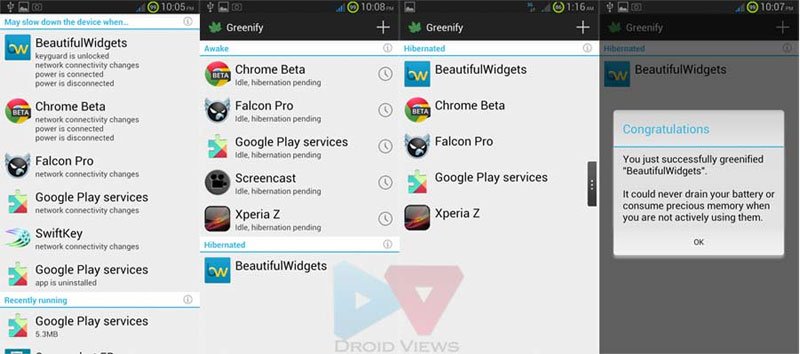
Greenify

While apps like JuiceDefender Ultimate and ROM ToolBox Pro aim at giving you better battery life and enhanced performance on your Android device respectively, Greenify targets both ends at the same time. Greenify lets you select apps that remain active and run as background processes even when they are not actively running. Now, such apps not only eat your phone’s ROM, making it slow and laggy, but also keep draining the precious battery juice continuously.
greenify-root-for-android
If you are one who is fond of installing a lot of apps, Greenify can save you from being worried about performance and battery life. It lets you identify rogue apps and allows you put them in hibernation mode so that they do not keep eating CPU and RAM resources and leeching battery power. The app is pretty easy to use. Simply add the applications you want to hibernate when they move to the background, and let Greenify do its spell.

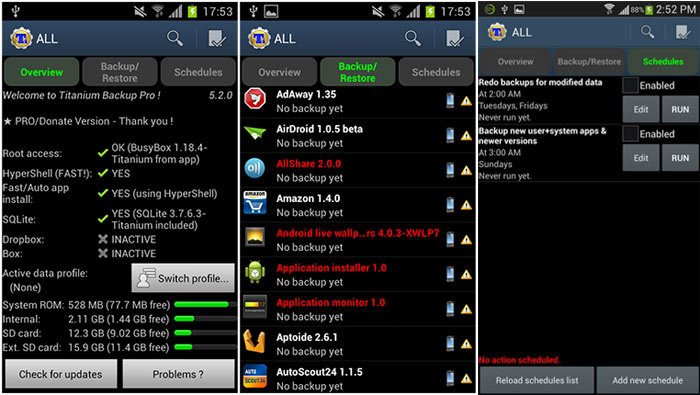
Titanium Backup

Good battery life, awesome performance and cool customization— we have seen one or more apps for these things. Now let’s see another must have and one of the most rated apps for rooted Android devices. If you got root privileges on your device, Titanium Backup is a highly recommended app for you. You might find a number of backup apps at the Google Play Store, but none of them does the job so perfectly and nicely. The only negative thing about the app is it user interface that feels outdated, but when it comes to functionality, Titanium Backup surpasses them all.
Titanium-Backup-pro
This best in class app can backup all apps (including system apps) and games on your apps with all app settings and data. You can backup apps individually, in groups or all at once. Also, before backing up or restoring the apps, you can choose whether to do the operation just with the apps, settings and data or a combination of all three. Besides, it also lets you schedule your backups. If you purchase the Pro key, you will also be able to use some premium features like—
  • Data migration (important for those who are fond of switching ROMs)
  • Dropbox sync and restore
  • Multiple backups per app support
  • Zero-tap batch restore
  • App freezer for keeping an app unchanged
  • Backup apps without closing any app
  • And more.

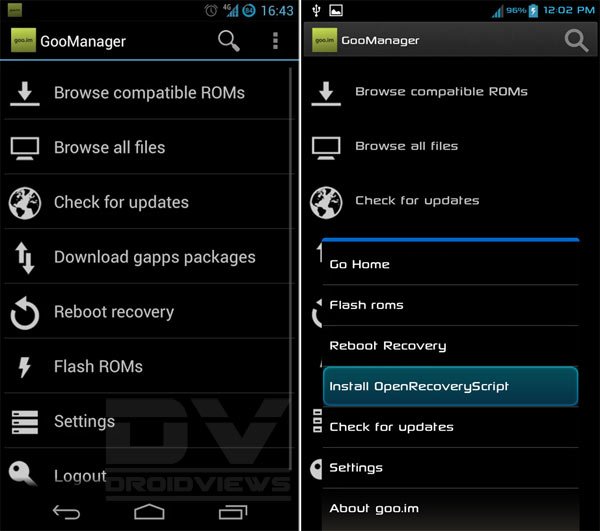
GooManager

If you are not new to Android, you must be familiar with the goo.im website that is one of the most popular hubs of Android custom ROMs, Google apps packages and popular custom recovery like TWRP. The GooManager app is a front-end app for users of rooted Android devices that can perform various tasks very easily. If you have root, you can install and update TWRP Recovery (if available) through this app. Since most custom ROMs for Android are hosted or mirrored at the goo.im site, the app is also capable of installing and updating ROMs on your device.
Goo-manager
You can browse compatible ROMs and Gapps and download all available files directly on your phone or tablet. The app also works like a reboot manager that lets you get your device into recovery mode without using the hard-keys combination.

Some More Apps

The list of best apps for root users is not yet complete. I have more apps in mind which I wish to include. Just exhausted by the length of the post, so here are some more apps without details to save time and space:

Trickster Mod Kernel

Root Browser

Full!screen

full!screen
Download @
Google Play

Developer: tsorn
Price: Free

Settings Extended

GMD GestureControl

Root App Delete

Root App Delete
Download @
Google Play

Developer: TopDev
Price: Free

App Quarantine Pro

with thanks to droidview